Download & Startup
- Installer (4.8 MB)
Archive password is "fwatch". Contains Fwatch core files, OFP Aspect Ratio, anims.pbo replacement and config_fwatch_hud.cfg. - 7z Archive (1.7 MB)
Archive password is "fwatch". Contains Fwatch core files. Extract contents to the game directory. Overwrite files.
Fwatch requires Windows XP or newer and 1.96, 1.99 or 2.01 version of the game.
It does not work with the Remastered version of the game, only with the legacy version.
Make exception in your Antivirus/Firewall software.
To start simply double click on the Fwatch.exe
Standard parameters (e.g. -mod=) passed to the Fwatch.exe will be transferred to the game.
Use shortcut (target field) or command line to type in arguments.
-nomap is added automatically when you start the game through the Fwatch executable.
Fwatch has its own custom parameters:
- -nolaunch - installs hook without starting the game. Then you can manually launch Flashpoint and/or dedicated server with OFPR_Server.exe / ColdWarAssault_Server.exe. Do not start or quit the Fwatch while the game is running or the latter will crash.
- -run= - name of the game executable that Fwatch will run.
- -reporthost - informs master server when you host a game (listen server) so it will show up in a browser. Port is set by the -port= parameter.
- -gamespy=<ip> - changes master server address for the in-game server browser.
- -removenomap - cancel adding -nomap automatically. For use on Wine on Linux.
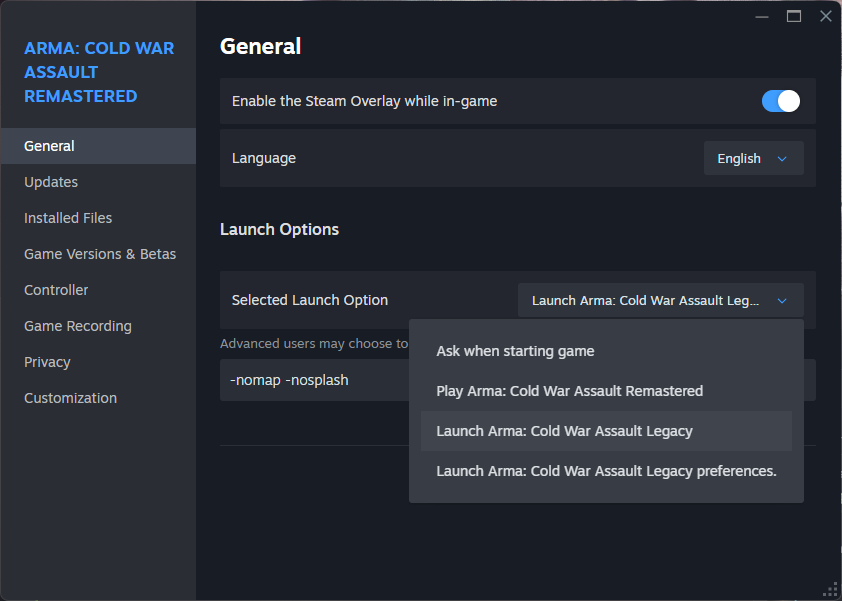
Argument -steam is deprecated because it launches the Remastered version of the game. As far as I'm aware it's not possible to pick a different executable when launching the game with command line through Steam. See discussion here. Replace -steam with -nolaunch in your command line. Then go to Steam library, Arma CWA properties, select Legacy version and type your game arguments there. Then launch the game from Steam library.
If you have Russian localization of the game ...